


For over two decades, Google AdSense and AdMob have helped millions of publishers monetize their websites and apps, giving them access to a huge pool of advertisers and consistently high fill rates. If you are one of them, with time, your publisher weight grows, you gain more good-quality traffic, and steadily magnify your worth for potential direct advertisers.
However, at this point, another problem arises – your traffic grows, but your revenue/eCPMs might stop growing just as well. That gap usually isn't about content or audience. It's about who sets the price for your impressions.
In this article, we’ll explore how the revenue ceiling is formed in such realms, how Google Ad Exchange (AdX) operates to fix that problem, and why Google's Multiple Customer Management (MCM) could be a perfect solution that lets mid-sized publishers effortlessly tap into AdX without having to build own sales or ad operations department.
Where AdSense and AdMob hit a ceiling
AdSense and AdMob are built to be simple, and simplicity has a price: you hand pricing decisions to the platform. That works at a small scale. Once your inventory is worth competing for, the same simplicity starts leaving money on the table.
This usually gets obvious in four key areas:
- Pricing you don't control. AdSense gives you no real floor-price control, and AdMob offers only simplified floors per ad unit. You can't say "this placement is worth at least $3" and have the auction respect it.
- Thin competition. More bidders per impression means higher clearing prices. In a closed or semi-closed setup, fewer buyers compete, so fill and eCPM plateau early.
- No route to premium deals. Agencies and brands running private marketplace (PMP) or programmatic guaranteed campaigns buy through DV360 and other DSPs. AdSense and AdMob don't give you a way to package inventory for those deals, so premium traffic gets priced like commodity traffic.
- Aggregated reporting. You see what you earned, not who paid it. Without source-level data, there's no way to tell which buyers value your audience or where yield is leaking.
None of this means AdSense or AdMob are bad products, although there are a lot of publishers who look for best Google AdSense alternatives. It only means that a publisher earning a few thousand dollars a month and a publisher earning $50,000 a month have very different problems to solve, so their monetization approaches will be different.
What AdX is, and why most publishers can't join directly
Google Ad Exchange (AdX) is Google's premium programmatic marketplace. AdSense might run simple auctions, but AdX extends the measures of what’s possible – you can set floor pricing, choose which buyers can compete, or activate guaranteed and private marketplace deals.
The demand is also different. AdX pulls in bids from Google Ads and DV360, plus third-party buyers and agencies that buy programmatically through Google's stack. Inside Google Ad Manager (GAM), AdX can also compete in the same auction as other exchanges through Open Bidding.
So why doesn't every publisher use it?
The thing is, direct AdX access comes with a contract-based Google Ad Manager 360 relationship, and Google reserves that for publishers with large, consistent traffic volumes and the in-house ad ops capacity to run it. Google states different impression thresholds (depending on the region), but in practice many mid-market sites and apps can’t reach it.
That leaves a large group of publishers in between: too big for AdSense to serve them well, too small for a direct Google contract. Google MCM was built to bridge that gap.
How Google MCM works
Google Multiple Customer Management (MCM) lets an approved partner represent your inventory inside Google's ecosystem. It replaced Google's older Scaled Partner Management program and formalizes the relationship in two roles.
The Parent is a Google-approved partner (Network) with its own Ad Manager 360 setup and AdX access. You’re the Child: the publisher who owns the site or app and its audience.
How you join depends on your current setup. If you only use AdSense and don’t have Google Ad Manager, you don’t need to set it up: the Parent adds your site or app to its own Ad Manager network.
If you already run an Ad Manager but don’t have AdX access, you delegate your inventory to the Parent under one of two models, Manage Account or Manage Inventory, which define how much control the Parent gets. Either way, once you accept the Parent’s invitation, AdX demand starts competing for your ad space.
The point is that Google holds the Parent to its quality and compliance standards, and the Parent does the work of meeting AdX's bar. You get access to the same demand without negotiating a direct contract with Google.
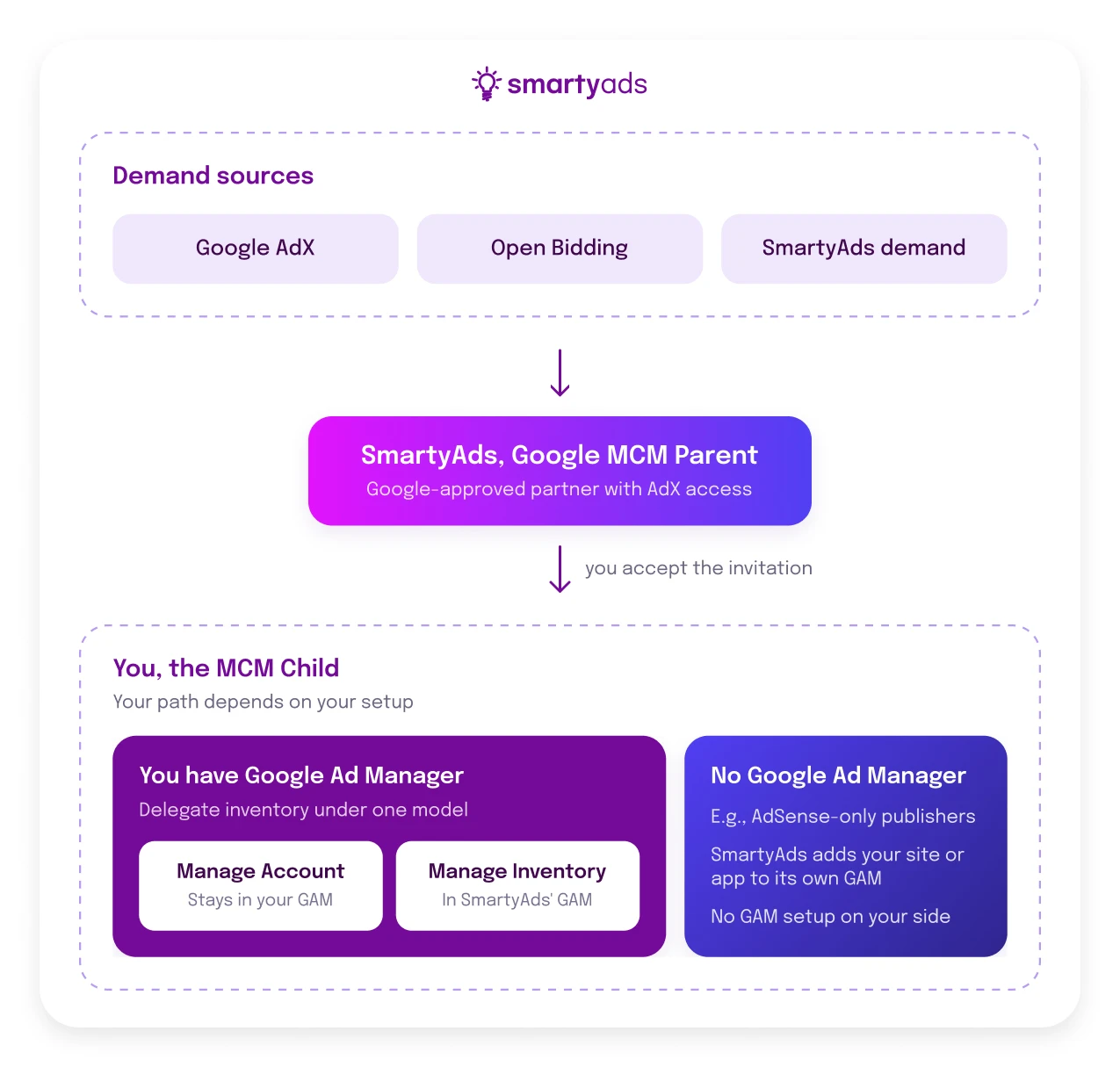
Demand flows down through the Parent into your inventory; how much the Parent manages depends on the model you pick. So, let’s break it down.
Managed account vs managed inventory
The right MCM model depends on one question: do you already run your own Google Ad Manager, and do you want to keep running it?
Google offers two delegation types (in Google's own help pages they're called Manage Account and Manage Inventory):
| No Google Ad Manager | Have GAM: Managed Account | Have GAM: Managed Inventory | |
| Best for | AdSense-only publishers and apps without GAM | Publishers who want to keep running their own GAM | Publishers with GAM who’d rather hand over ad ops |
| How you join | The Parent registers your site or app in its Ad Manager | You delegate your GAM account to the Parent | You delegate your inventory to the Parent |
| Where inventory is managed | In the Parent’s GAM | In your own GAM | In the Parent’s GAM |
| Parent’s access | No account of yours to access | Your GAM account, except billing | Only the delegated inventory |
| Who runs ad ops | The Parent | You, with the Parent’s support | The Parent |
| Reporting | From the Parent | In your GAM | In the Parent’s network, broken down by child |
| Payments | Through the Parent | Google pays you directly | Typically through the Parent |
No Google Ad Manager suits publishers who monetize through AdSense alone or have never set up GAM. The Parent registers your site or app in its own Ad Manager and handles setup, demand activation and optimization, so you don’t need to build or staff a GAM operation. The trade-off is that more depends on the Parent, so payout terms and reporting transparency matter more.
Managed Account suits publishers who already have a working GAM setup and want to keep running it. You stay in control of floors, A/B tests, direct deals and Open Bidding settings; the Parent brings AdX demand and expertise into your account. Because payments come straight from Google, your cash flow doesn’t depend on the Parent.
Managed Inventory suits publishers who have GAM but would rather not run it day to day. Your inventory moves to the Parent’s Ad Manager, and the Parent takes over setup, demand activation and optimization. As with the no-GAM path, payout terms and reporting transparency matter more here.
So, which model is better if you already have GAM? It depends on your traffic volume, growth plans and the MCM partner you work with. Managed Account makes sense if you have an ad ops team and want to keep every setting in your hands. But if your partner brings more than AdX access, Managed Inventory is worth exploring. For instance, SmartyAds offers deal management infrastructure, its own programmatic business and a diverse selection of Open Bidding partners, all of which can work on your inventory without you building it in-house.
What changes after you connect
AdX via MCM isn't just "more Google demand." It changes how your impressions are sold. Four things matter most.
Open Bidding: Getting More Buyers in the Game
Open Bidding lets 3rd party exchanges jump into the auction alongside AdX, all within Google Ad Manager. Every impression goes to the highest "real" bid, and you don't need to add a bunch more header bidding code to your pages or SDKs in order to get this going.
DV360 Deals: Unlocking Agency Budgets
For a lot of brands and agencies, planning premium campaigns involves setting up private marketplaces or programmatic guaranteed deals in DV360. With AdX on board, you can take your inventory and package it up in these deals too - meaning a well-defined audience can snag those high-priced deals rather than being stuck with open-auction pricing.
Floors: Setting Your Price Floor
Instead of just going along with whatever price AdX decides to throw your way, you can actually set a minimum price for your inventory. This is called a price floor, and you can set it by placement, format, device or even geography. Good floors can really raise those average CPMs without killing your fill rate - but bad floors can do the opposite, which is why floor tuning is an ongoing process rather than a one-time setup.
Source Level Reporting: Where the Money Really Comes From
When it comes to reporting, revenue is broken down by the source of the demand. Thus, you can see which buyers are really willing to pay up for those hard to get placements. This isn't guesswork anymore - this is actual data that lets you make informed decisions: which formats to test, which floors to tweak, and which deals are actually worth pursuing.
AdSense vs AdMob vs AdX at a glance
The difference comes down to who controls pricing and how many buyers compete.
| Capability | AdSense | AdMob | AdX via MCM partner |
| Built for | Websites | Mobile apps | Web, in-app, video, CTV |
| Eligibility | Open to all | Open to all | Large publishers directly, everyone else via MCM |
| Competition for each impression | Google-run auction | Google demand plus mediation and bidding partners | AdX plus Open Bidding partners in one auction |
| Floor price control | None | Simplified, per ad unit | Full: by placement, format, geo, device |
| PMP and DV360 deals | No | No | Yes |
| Reporting | Aggregated earnings | By ad source, limited buyer detail | By demand source, live |
| Setup effort | Minimal | Low | Higher, or handled by the partner |
Checklist: how to choose an MCM partner
Once you're inside AdX, the partner you connect through shapes most of your results. Before signing, get clear answers to these questions.
- Is the partner an approved Google MCM parent? Ask for confirmation, and check that the partner's seller details will appear correctly in your ads.txt or app-ads.txt.
- Which delegation models do they support? A good partner offers both Managed Account and Managed Inventory and helps you pick, rather than pushing the one that suits them.
- What's in the demand stack besides AdX? Ask how many Open Bidding partners are live, whether DV360 deals are available, and what demand the partner brings on its own.
- What's the revenue share? Get the split before go-live. Check whether it changes as you grow, and ask directly about any other fees or deductions.
- Who pays you, and when? Under Managed Account, Google pays you directly. Under Managed Inventory, confirm the payout schedule and currency.
- What will you see in reporting? You should be able to see revenue by demand source, format and placement, not just a monthly total.
- Who controls floors and settings? Clarify which levers stay with you and which the partner manages, and how changes are communicated.
- You need to know if there's a dedicated ad ops guru on board or someone who will be tweaking those floor prices and testing out different ad formats - and how often they'll be checking in on your account.
- How fast is onboarding? Ask what the partner needs from you, and how long until AdX demand is live.
- How do you exit? Check the notice period and what happens to your GAM setup if you leave.
- Does the partner run its own MCM program? Some companies rent another organization’s Google Ad Manager access, which violates Google’s policies and puts your revenue at risk. Check that the seller name in the partner’s sellers.json matches the company you’re signing with.
From access to results
Getting into AdX is simple to explain but is not that easy to handle. When you choose a dedicated partner, just an AdX access isn't what brings in the cash – it's the other buyers competing for that space, the right floors prices that reflect how valuable your ad space is, and – someone actually paying attention to those nitty-gritty details. Publishers who connect and then leave everything on default usually see a smaller lift than they expected in the first place.
That's also why the choice between Managed Account and Managed Inventory is really a choice about workload. If you have your own GAM and the people to run it, keep control and add demand. If you don't, the partner's ad ops team becomes part of your monetization setup, so their attention matters as much as their demand.
If you've outgrown AdSense or AdMob but don't qualify for AdX directly, SmartyAds can connect you as a Google MCM partner under either model. If you run your own Google Ad Manager, we link it as a Child account and you keep control of floors, tests and deals, with Google paying you directly on Net-30 terms. If you don't, your inventory runs on the SmartyAds Ad Manager and our ad ops team handles setup and optimization. Either way, AdX competes alongside Open Bidding partners, DV360 deals and SmartyAds' own demand, and the revenue share is agreed in writing before go-live and decreases as your monthly revenue grows.
You can apply for AdX access and share your current setup; our team will walk you through which model fits and what the move could mean for your revenue.


.webp)